Speed up repairs and achieve higher First-Time Right Rate
Trace errors to system dependencies, uncover recurring patterns, and resolve E/E issues faster, reducing downtime and improving service quality.
What can you achieve with this use case?
Trusted by











VIN-specific 3D signal explorer
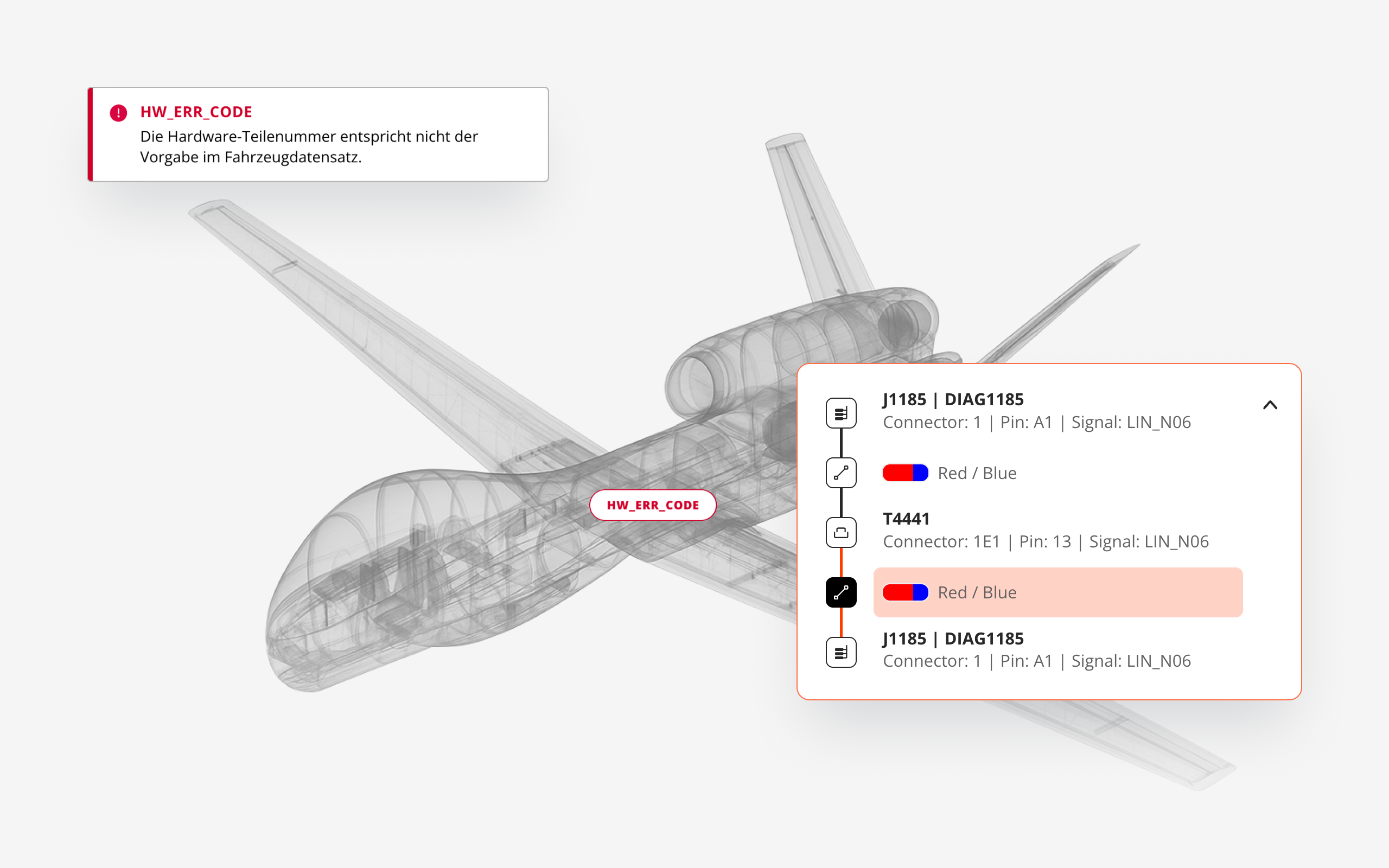
Your teams can search for electric components in 3D, find communication partners and locate signal paths at a VIN-specific level. Instead of the 150% model covering all possible variants, we ensure that only components that are installed are displayed.
Focus analysis ranks root cause
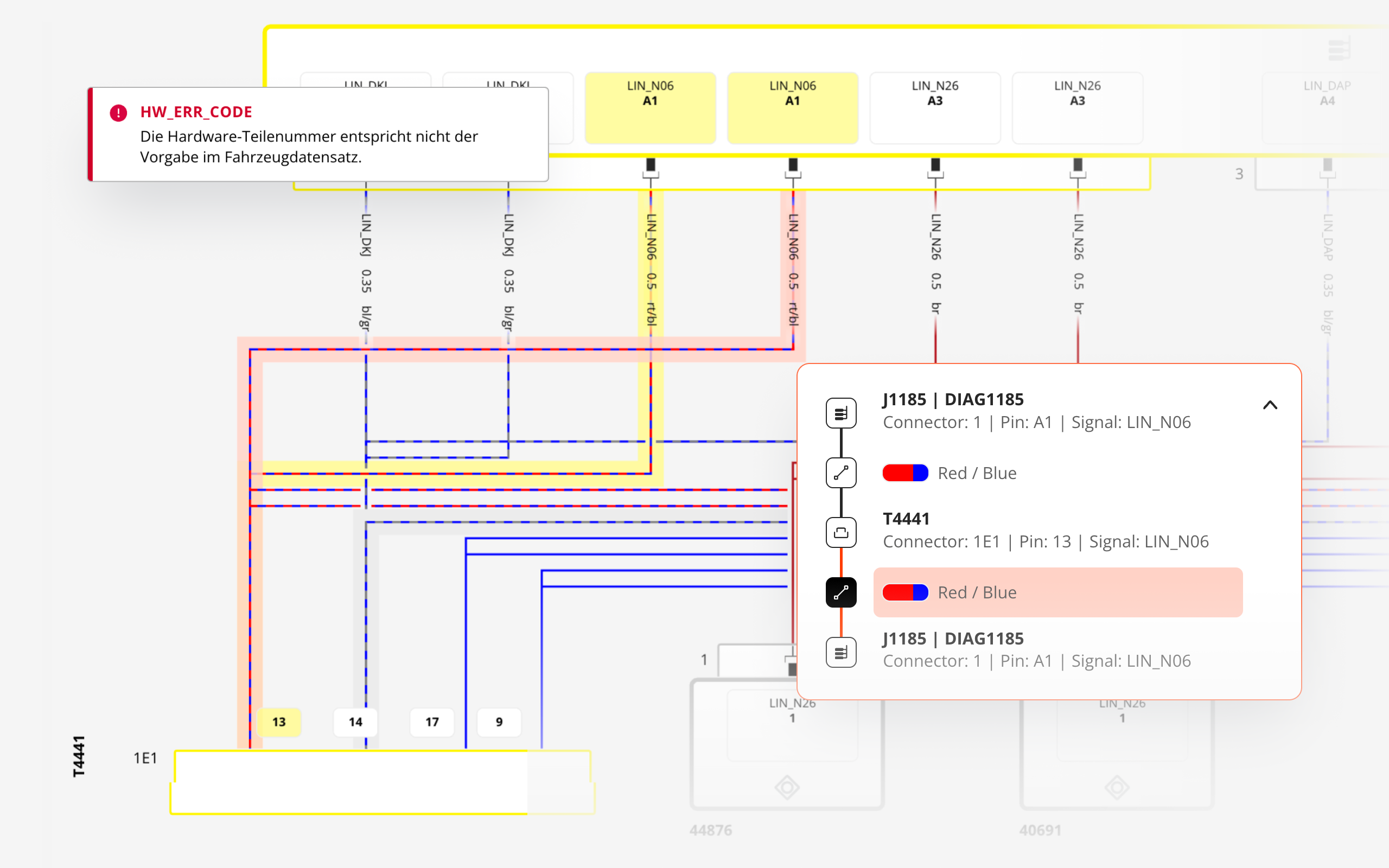
A focus analysis correlates DTC timelines, signal anomalies and network topology, then ranks the most probable ECU or connector and displays the supporting evidence for fast, confident action.
Wire-level 2D troubleshooting
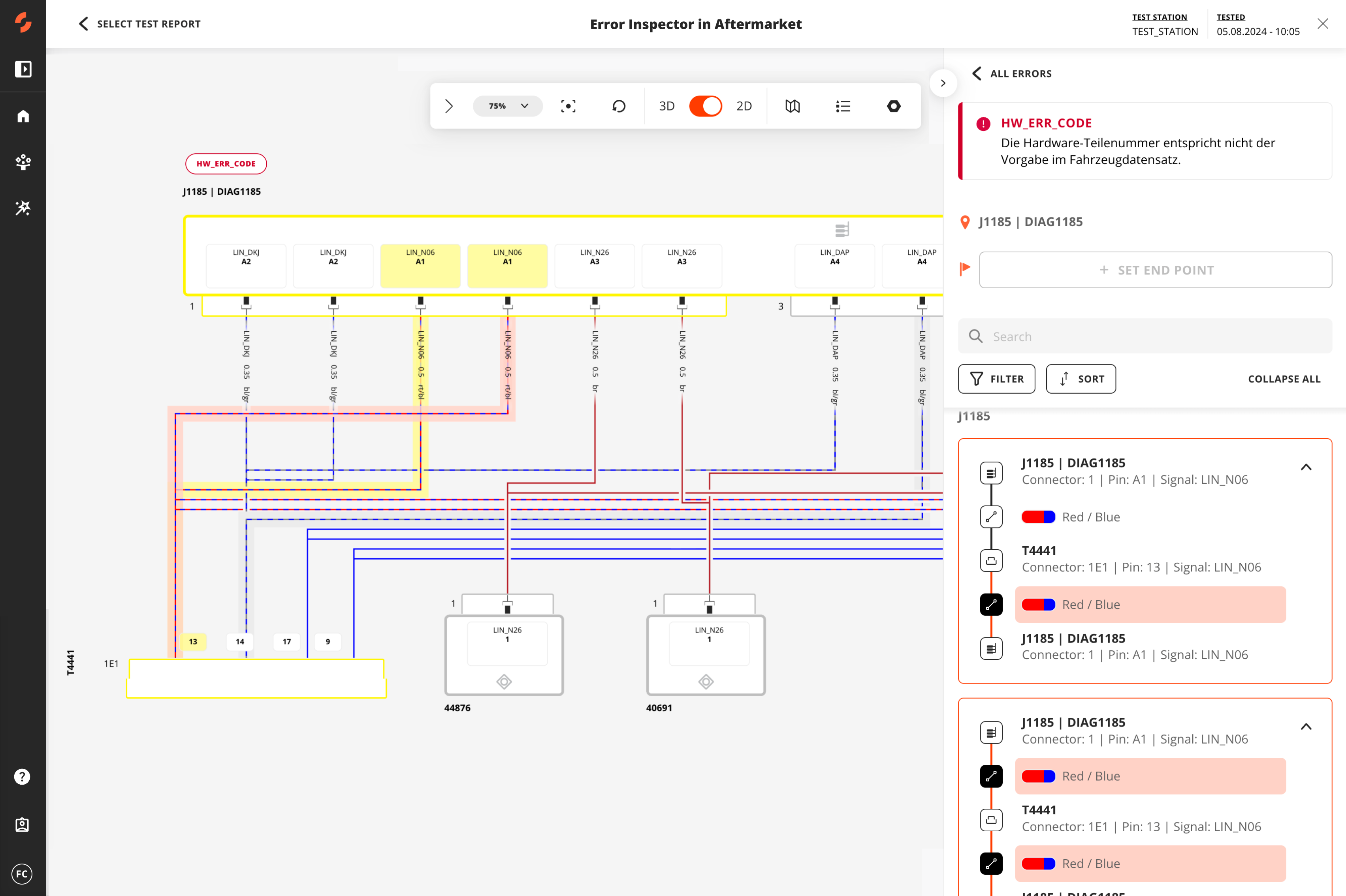
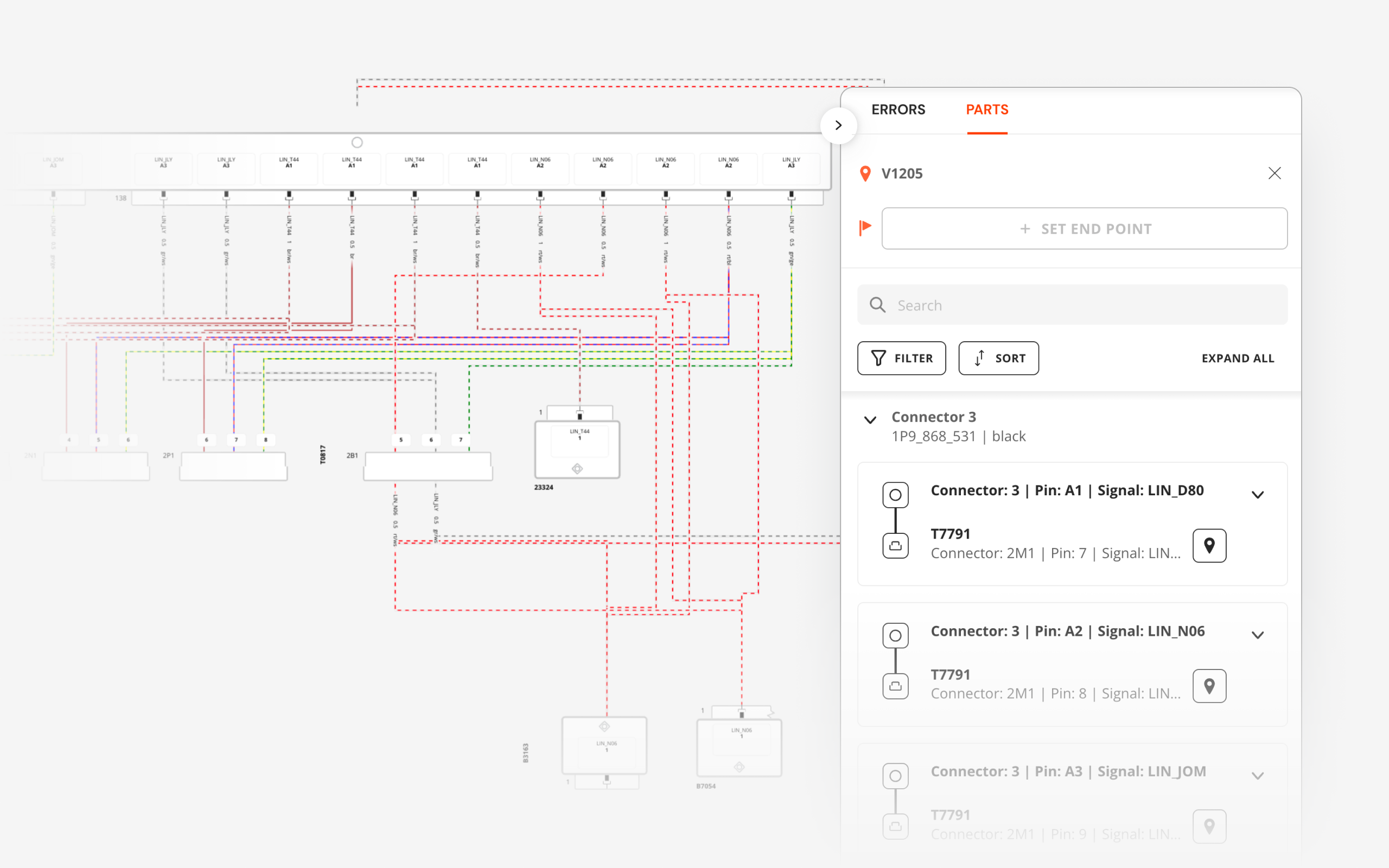
Users pivot instantly between VIN-filtered 3D locations and detailed 2D schematics, pinpointing the exact wires and connectors to troubleshoot, without context switching.
Get an instant tour
See how SPREAD turns complex product data into clear, actionable insights. Take a quick tour and see how this solutions deliver impact.
Get an Instant Tour
By submitting you agree to our privacy policy.
What types of data does SPREAD connect and analyze?
SPREAD Inspector integrates critical data from multiple systems and unstructured sources to provide complete traceability from issues to root cause. It connects and contextualizes:
| Data Type | Description | Typical sources | File Formats needed |
|---|---|---|---|
| Wiring-harness topology | Pin-to-pin connectivity, module & connector part-numbers, wire colours/lengths, splice & ground points – the backbone for path-finding and VIN filtering. | Harness engineering (KBL/VeC authoring tools, PDM) |
.kbl
.vec
.xml
|
| BoM + configuration codes | 150 % parts list plus variant / feature codes that let Inspector cut the harness to the exact VIN build. | ERP / MES / BoM databases |
.xls(x)
.csv
.xml
|
| Diagnostic test results | Tester log with VIN, station, time-stamp, ECU IDs, triggered DTCs & error texts – the starting point for every investigation. | Company specific system |
.json
.xml
|
| Geometry & schematics | Lightweight 3D shell, optional harness JT, and 2D wiring diagrams (pins, grounds, splice nodes) for visual drill-down from vehicle to wire. | CAD/PDM for 3D, wiring-diagram authoring |
.jt
.svg
.pdf
.png
|
| Mapping & meta-data | Lookup tables linking harness IDs, DTC IDs, ECU addresses, plus diagnosis specs that define error classes and repair hints. | Company specific system |
.xls(x)
.pdx
.odx
|
Engineering success in action
confidently and unlock innovation with SPREAD.
FAQ
What is Engineering Intelligence ?
SPREAD’s Engineering Intelligence is a specialized network of AI agents designed specifically for engineers. It is built on three core layers: Rapid Date Ingestion: Connectors integrate data from diverse engineering tools, creating a unified environment where AI agents access structured and unstructured data. Product Twin (PT): Powered by a robust Knowledge Graph, the PT is a digital replica of each product that organizes and contextualizes data, offering a single source of truth. It enables AI agents to analyze product relationships, anticipate challenges, and deliver context-aware insights. Action Cloud: This processing hub is where SPREAD’s AI agents operate, automating tasks like compliance checks, requirements optimization, and error management. Together, these layers enable engineers to focus on innovation while Agentic EI manages the data-intensive tasks.
What is an Engineering Intelligence Graph (EI Graph) ?
The Engineering Intelligence Graph (EI Graph) is the core technology behind SPREAD, mapping and linking various data points and relationships within product data to provide a comprehensive and actionable overview. If you like to learn more about it, please watch our video: Introduction to GraphQL.
What types of data does SPREAD E/E Inspector connect and analyze?
E/E Inspector pulls from a variety of data sources, including wiring harness data (such as kbl/vec standards), electronic component data, diagnostic protocols, the Bill of Materials (BOM) and more. This information is processed to provide detailed, VIN-specific diagnostics and troubleshooting.
How does E/E Inspector integrate with existing systems, including PLMs and PDMs?
SPREAD E/E Inspector in Aftermarket seamlessly integrates with your existing diagnostic tools, wiring harness data, engineering databases, and Product Lifecycle Management (PLM) or Product Data Management (PDM) systems. By pulling data directly from BOM, ECU communication networks, and diagnostic protocols, the solution bridges the gap between R&D, Production, and Aftermarket phases. It ensures that any product changes in the PLM/PDM system are reflected within SPREAD, allowing for real-time updates and vehicle-specific diagnostics.
What kinds of errors can E/E Inspector detect?
The solution can detect a wide range of errors, including:
- Communication errors between control units (ECUs)
- Ground and supply errors
- Hardware/software mismatches in installed components
- Component failures detected during diagnostic tests
- Test errors, such as interrupted or abandoned diagnostic procedures
Can E/E Inspector be customized to meet my specific Aftermarket requirements?
Yes, E/E Inspector in Aftermarket can be tailored to fit your specific needs. Whether it’s integrating with your existing toolchain, customizing error detection rules, or adjusting visualization preferences, the solution is highly flexible. You can also use our platform to build your own cloud-based solutions for specific use cases.
How does E/E Inspector improve troubleshooting for connectors?
E/E Inspector provides real-time tracking of signal paths between connectors and components. Technicians can view detailed wiring and signal diagrams, including pin-level data and connector housing specifications, allowing for quick identification and replacement of faulty connectors.
How does E/E Inspector update with changes in vehicle design or manufacturing?
The solution continuously updates based on the latest engineering and manufacturing data. Whenever there’s a change in the BOM or wiring configuration, the solution automatically reflects these updates in the VIN-specific diagrams and troubleshooting protocols.
Can you show me how E/E Inspector works?
Yes, we'd be happy to schedule a follow-up meeting to demonstrate how E/E Inspector in Aftermarket can integrate with your workflow. Reach out to us through our website or contact our team directly to book your session.
How to
get started
1
Jointly scope
use cases
We bring practical expertise to understand your challenges and scope the right solutions with you.
2
Deploy solutions
rapidly
Within weeks we deploy our platform, integrate the required product data and configure the defined solutions.
3
Rollout across
the company
We train users across teams, scale company-wide, and support you continuously on the way.